
Encoding, encryption, and hashing all change how data looks as bytes or text, but they are not the same thing. Swap one for another in production and things break fast, especially around security.
The Problem
Base64 does not hide passwords. Encrypting passwords instead of hashing them means whoever steals the key owns every account. Hashing credit card numbers makes them impossible to retrieve. Game over for billing.
Getting these three right isn't advanced cryptography. It's vocabulary.
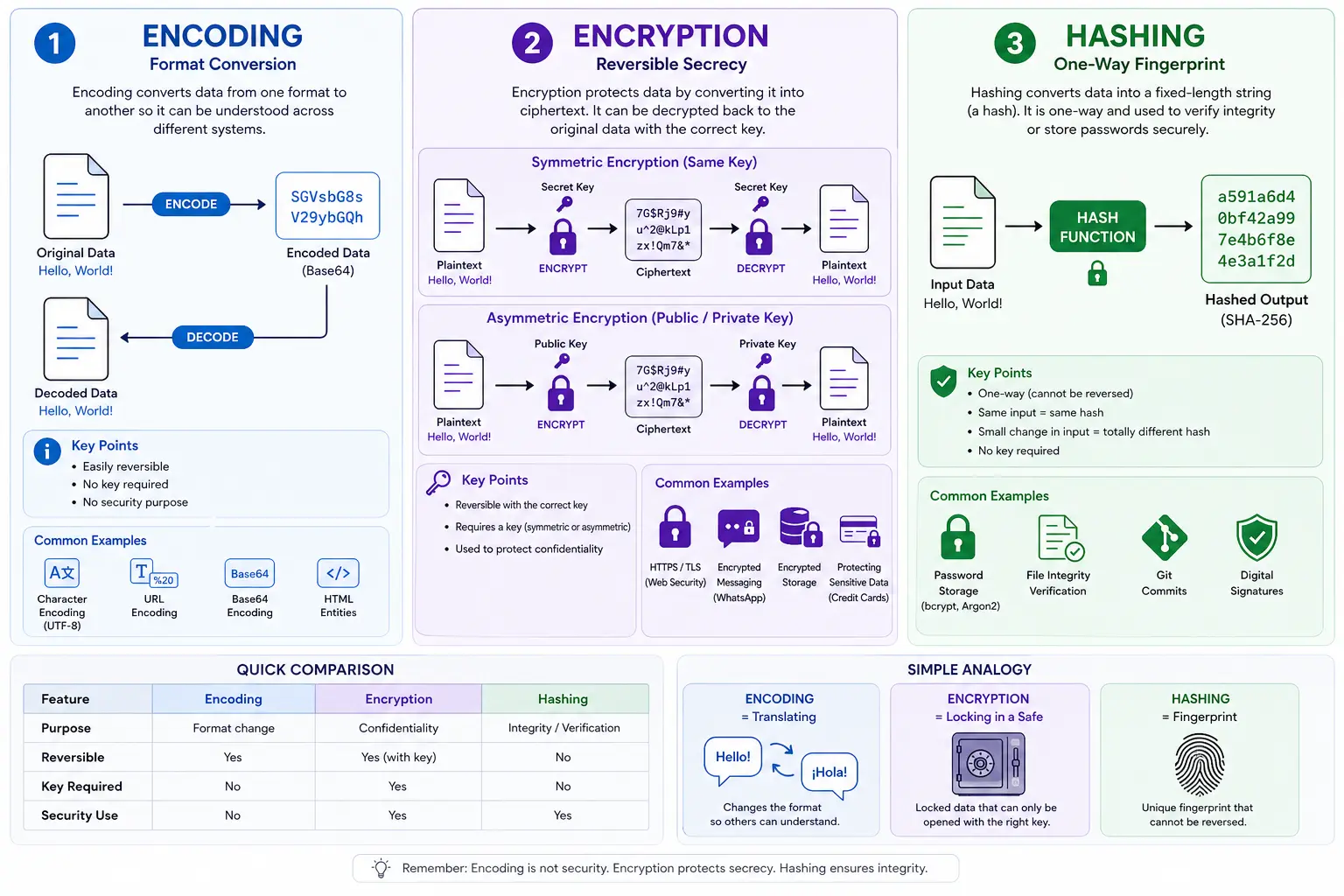
Encoding: format conversion
Goal: Make data readable across different systems.
- Converts data into a format a target system can handle
- Easily reversible: no key needed, just the spec
- Has no security purpose
Where it is used:
- Base64: embed images in HTML or send binary data over text-only APIs
- UTF-8: represent text as consistent bytes
- URL encoding:
%20for a space in a URL
Think: translation, not protection.
Encryption: reversible secrecy
Goal: Keep data secret from unauthorized parties.
- You scramble data using an algorithm and a key
- Anyone with the correct key can reverse it and recover the original data
- It is reversible
Where it is used:
- HTTPS (your browser talking to a website)
- WhatsApp messages (end-to-end encryption)
- Storing sensitive data like credit card numbers in a database
Types:
- Symmetric: same key encrypts and decrypts (AES)
- Asymmetric: public key encrypts, private key decrypts (RSA)
Think: lock and key.
Hashing: one-way fingerprint
Goal: Verify data integrity or store passwords safely.
- Converts any input into a fixed-length string
- Cannot be reversed: there is no key, no decryption step
- Same input always produces the same hash
- One-character change → completely different hash
Where it is used:
- Password storage: bcrypt, scrypt, Argon2 (deliberately slow to resist brute-force attacks)
- File integrity checks: SHA-256 on a download confirms the file was not tampered with in transit
- Git commit IDs
Think: digital fingerprint.
Important: SHA-256 alone is not safe for passwords: it is too fast, which makes brute-forcing cheap. Use bcrypt, scrypt, or Argon2 for passwords. Use SHA-256 for checksums and data integrity checks. If you see someone "decrypting" a hash, that is a red flag.
Quick comparison
| Feature | Encoding | Encryption | Hashing |
|---|---|---|---|
| Purpose | Format change | Confidentiality | Integrity / storage |
| Reversible | ✅ Yes | ✅ Yes (with key) | ❌ No |
| Key required | ❌ No | ✅ Yes | ❌ No |
| Security use | ❌ No | ✅ Yes | ✅ Yes |
Simple analogy
- Encoding: translating English to Spanish. Anyone who knows Spanish can read it. No secrets.
- Encryption: locking something in a safe. Only the person with the key gets in.
- Hashing: taking a fingerprint. Unique identifier, but you cannot reconstruct the person from the print.
Key takeaways
- Encode data only to move it between systems; encoding provides zero security
- Encrypt data you need to retrieve later: billing details, personal records, sensitive config
- Hash passwords with a slow algorithm (bcrypt, scrypt, Argon2); never encrypt them, never use SHA-256 alone
- Wrong tool, real consequences: encrypting passwords, encoding secrets, or hashing card numbers are each a separate class of bug