ysskrishna logoysskrishna

AI Support Bot

Chat over the help docs you load, in a web UI you can spin up with Docker Compose.

Gallery image 1
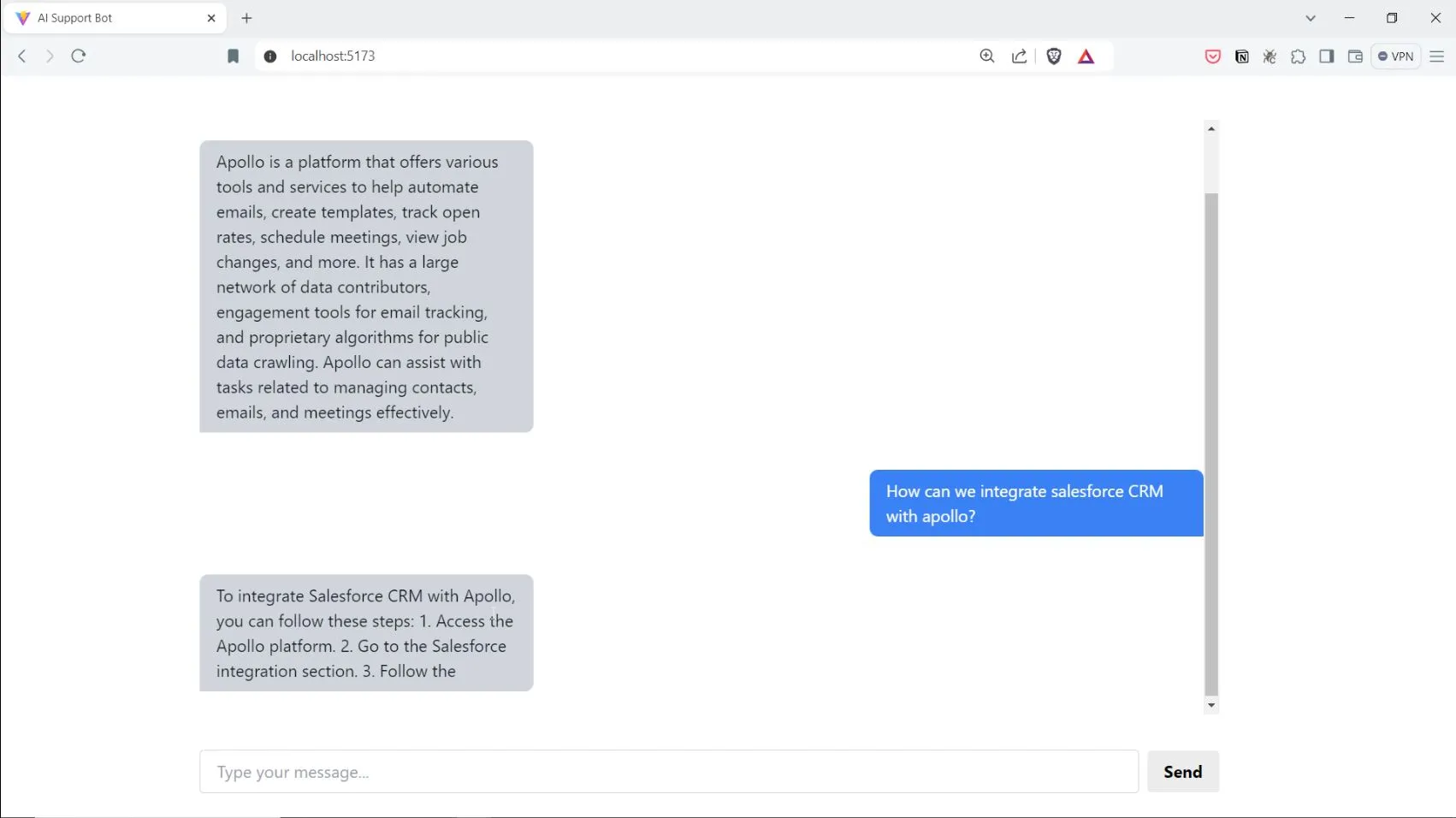
Gallery image 2
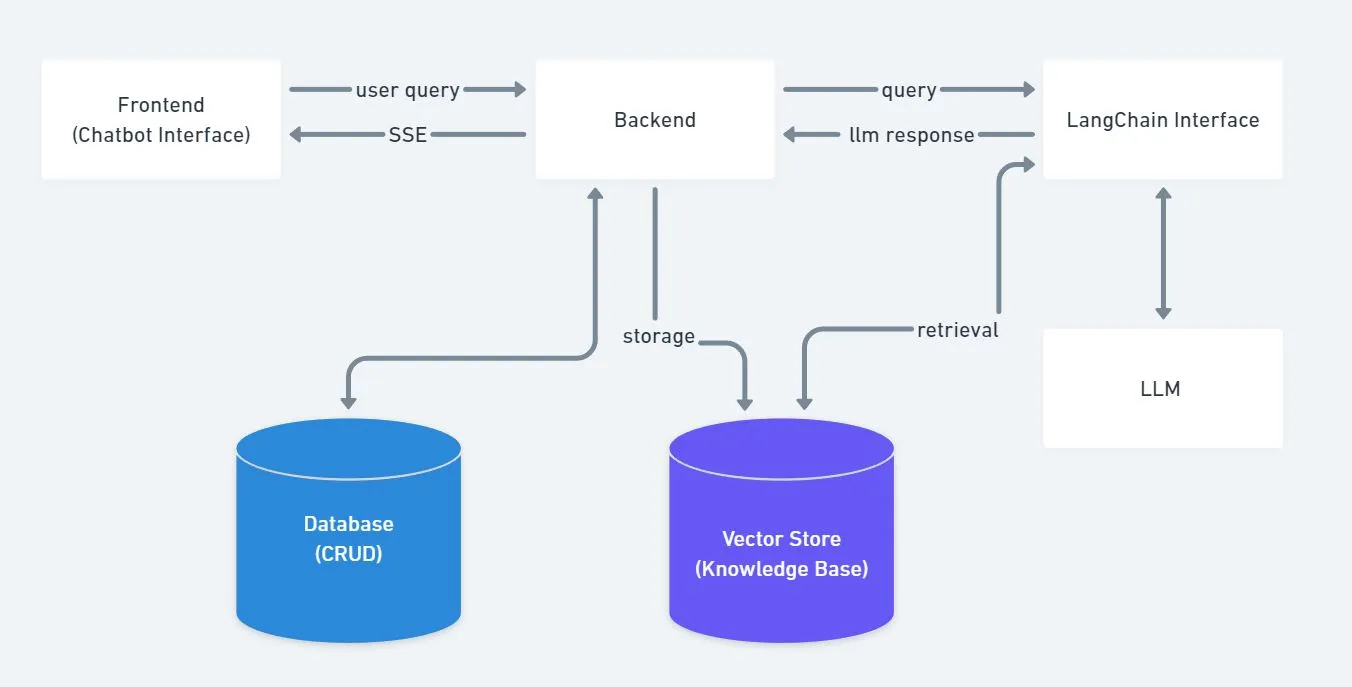
Gallery image 3
Get it
Built with
AI Apps & Assistants
OpenAI
LangChain
ChromaDB
FastAPI
Python
JavaScript
React
Tailwind CSS
Docker
Details
FreeAGPL-3.0 licenseCreated August 4, 2024Updated November 12, 2026
Share this product

Customers keep asking the same questions. Your docs already have the answers.

The hard part is getting those answers into a chat that sounds helpful, stays on your material, and does not invent policy. You want to show stakeholders something real before you bolt on ticketing, auth, and retention rules.

AI Support Bot is a full-stack demo you run yourself: load your knowledge, chat in the browser, and see how retrieval-backed replies behave.

Your docs in the chat window, not a generic model monologue.

What you get

  • A working chat UI wired to your loaded knowledge. Answers are meant to draw on material you provide, not free-form guessing alone.
  • Room to refresh what the bot knows. The project supports dynamic dataset loading so you can update sources without rebuilding the whole app from scratch.
  • A quality lens on replies. Responses are evaluated on relevance, accuracy, coherence, completeness, creativity, tone, and alignment with intent, so you can talk about quality with stakeholders, not just vibes.
  • One-command local spin-up. Docker Compose builds and runs the stack; you tune secrets in the backend environment file when needed.
  • Honest limits up front. Chat history is not stored in a database yet, and wrong answers remain possible, so you still plan human escalation for high-stakes topics.

Picture your Tuesday

You are prototyping an internal help bot (an illustrative case). You load a slice of your handbook, open the web chat, and ask the questions your team actually types in Slack. You watch whether answers stay tied to what you uploaded, then share the screen in a roadmap meeting instead of a slide full of architecture boxes.

Keep exploring

Ready to try it?

  • See it on GitHub for the README, flowchart, and Docker Compose setup
  • Price on this site: Free, licence AGPL-3.0
Frequently asked questions

How do I run the full-stack RAG demo locally?

Adjust the backend environment file if any variables need changes, then use Docker Compose to build and run the containers. When they are up, open the frontend at port 5173 and the backend at port 8081 on your machine.

Can I run this stack with Docker Compose?

Yes. The README documents starting the project with Docker Compose build and run, with separate frontend and backend URLs once containers are running.

What is still unfinished?

The README lists pending work to add a SQL or NoSQL database to store user queries and generated responses. Until then, treat logging and retention as something you add yourself.

Why not just follow a LangChain RAG tutorial myself?

You can. This repo builds on the same family of ideas as the linked LangChain RAG tutorial, but ships as a full-stack chat app with a web front end, container setup, and the evaluation framing described in the README.

How are chatbot answers checked for quality?

The README states that model responses are scored on relevance, accuracy, coherence, completeness, creativity, tone, and intent alignment. Those scores are heuristics to guide review, not a guarantee every reply is correct.

Is it free?

Yes. The product record lists the price as Free and the licence as AGPL-3.0, so you can clone and run the stack on your own hardware without a separate purchase on this site.

Do wrong answers still happen?

Yes. Retrieval-grounded chat can still misread context or go stale. Use human escalation for regulated, safety-critical, or high-stakes topics, and verify answers against your source material.

What tech does it use?

The README lists a React front end, FastAPI backend, vector storage, LangChain, OpenAI, and Docker. Details and versions live in the repository.

Continue exploring

ProductAI Game Playtesting Agent

AI Game Playtesting Agent

Repeatable browser playtests with screenshots, metrics, and a campaign report you can share.
AI Apps & Assistants
OpenAI
+4
BlogCover image for 17 Thinking Skills for AI Agents: Pre-Mortem, Five Whys, Six Hats and More

17 Thinking Skills for AI Agents: Pre-Mortem, Five Whys, Six Hats and More

AI Apps & Assistants
Agent Skills
4 min read
ToolCover image for AI Token Counter

AI Token Counter

AI token counter with model pricing and context-window comparison in your browser.

Chat & AI
AI Apps & Assistants
+1
CourseCover image for Prompt Engineering for Coding Agents

Prompt Engineering for Coding Agents

Write prompts that coding agents act on: clear goals, the right context, output contracts, examples, structured thinking, shorter answers and a tiny eval set.

Agent Skills
Chat & AI

8 chapters · 17 min

BlogCover image for How to Install Caveman in Cursor and Claude Code

How to Install Caveman in Cursor and Claude Code

AI Apps & Assistants
Agent Skills
+1
3 min read
Productskills.sh+1Claude Code Subagents for Cursor

Claude Code Subagents for Cursor

Your Cursor subagents can finally run on the model you picked in each agent file.
Chat & AI
Agent Skills
+2