Merged cells make a sheet easier for people to read: a team name spanning its members, a date over its time slots, a section header across a report. They also make the sheet harder for formulas, sorting, filtering and pivots. Knowing which you need saves hours.
What a merge does
When Google Sheets merges cells (Format → Merge cells), the merged block keeps only the top-left value. Sheets warns you when other cells in the selection have values, because they are discarded.
That is the core problem Merge Tools solves: merging the way people want to see it without silently losing values, and getting the values back when you unmerge.
Merge, concatenate, group
| Want | Use | Data kept? |
|---|---|---|
| One label spanning a block of rows | Merge | Only one value per block, by design |
| Several values shown together in one cell | Concatenate & Merge | Yes, joined with a separator |
| Collapse detail rows under a heading | Sheets' row grouping (select rows → right-click → Group) | Yes, untouched |
| A sortable, filterable table | No merges at all | Yes |
A good rule: merge only in sheets meant for reading or printing. Keep the source data unmerged on another tab.
The four modes
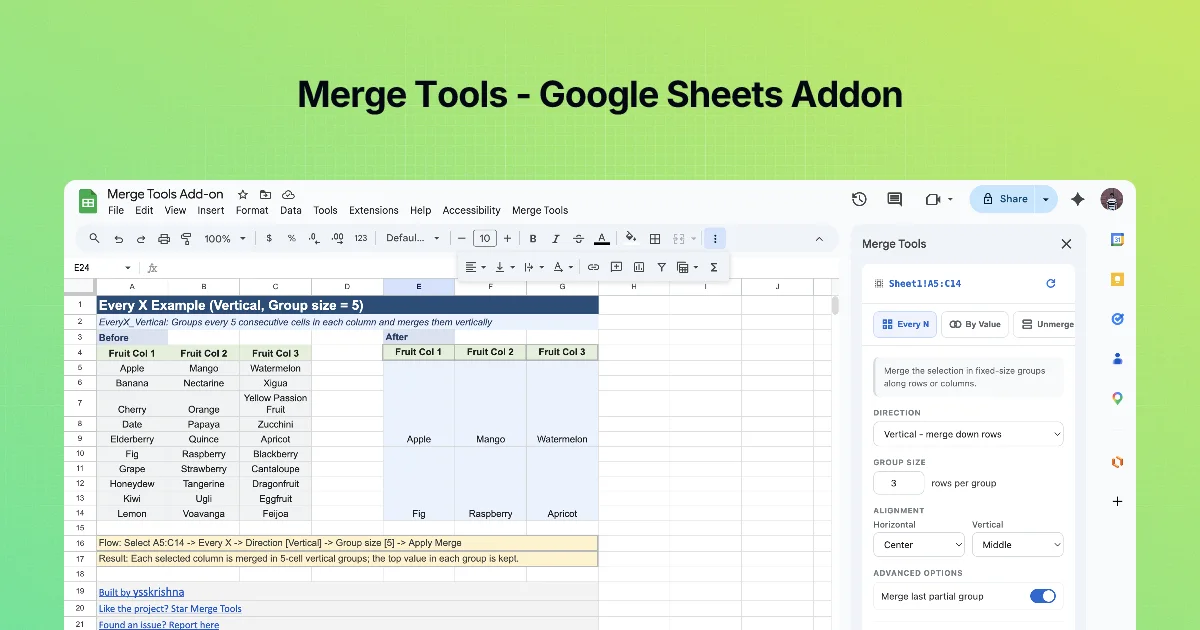
Open Extensions → Merge Tools. The sidebar shows the selected range at the top (for example Sheet1!A5:C14, with a refresh icon) and four tabs:
| Tab | Description in the sidebar |
|---|---|
| Every N | "Merge the selection in fixed-size groups along rows or columns." |
| By Value | "Merge repeated values along a column or row, or merge each value with the empty cells below or to the right." |
| Unmerge | "Split merged cells in the selection." |
| Concat | "Join cell values with a separator, then merge into one cell." |
Common options on the merge tabs: DIRECTION (vertical down columns or horizontal across rows) and ALIGNMENT (horizontal left/center/right; vertical top/middle/bottom).
Step by step: first look
- Install Merge Tools from its Marketplace listing.
- Open a sheet, select a small range, open the sidebar.
- Check the range shown at the top matches your selection. If you change the selection, click the refresh icon.
- Click through the four tabs and read each description.
Before you merge anything
- Duplicate the tab, or practise in the examples workbook.
- Decide which tab is for reading and which is for data.
- Merging inside a range you later sort will block the sort ("all merged cells need to be the same size").
Worked example: pick the right tool
Each row below is a real request type. Decide which tool fits before reading the answer column.
| Request | Right tool | Why |
|---|---|---|
| "Show each department once, spanning its rows" | Merge (By Value, Merge repeated values) | Same value repeated down a column; you want one visible label |
| "Put all of a customer's tags into one cell" | Concat (Concatenate & Merge) | Several different values must survive in one cell |
| "Let me collapse the Q1 rows while I read Q2" | Native Sheets row grouping (no merge) | You want to hide rows, not change cells |
| "Each 3-row block is one time slot" | Merge (Every N, group size 3) | Fixed-size blocks regardless of content |
| "This downloaded report won't sort" | Unmerge, with "Copy merged value to every cell" on | Merged cells block sorting and filtering |
Common mistakes
- Merging in the data tab. A merged cell keeps only the top-left value, and formulas such as
VLOOKUP,QUERYor a pivot table that read the range afterwards see blanks in the other rows. Merge a presentation copy, keep the raw data unmerged. - Treating merge as "combine". If you need both "Core" and "Web" to survive, a merge is the wrong operation; use Concat.
- Merging before sorting. Sheets refuses to sort a range that contains merged cells of different sizes, so sort first, merge last.
- Forgetting alignment. A tall merged cell with default bottom alignment reads as if the label belongs to the last row. Set Vertical alignment to Middle in the sidebar before you click Apply Merge.
If you only remember one rule from this chapter: merge is a display decision, made at the end, on a copy.
Quick check
-
What does a native Sheets merge keep?Only the top-left value of the block.
-
You need to show three emails in one cell. Merge or concatenate?Concatenate (Concat tab), so all three values are kept.
-
Where should merges live?In sheets meant for reading or printing, not in the data you sort and filter.