Table Converter for Google Sheets: Import and Export Markdown, JSON, HTML and CSV
Import Markdown, JSON, HTML and CSV tables into Google Sheets without broken columns, and export any range as clean Markdown, JSON, HTML or CSV.
6 chapters · about 16 min · free
 Google Sheets
Who it is for: Developers, technical writers and analysts who move tables between Sheets and READMEs, docs, APIs, chat and email.
What you will learn
- Explain why pasted tables break and how a converter avoids it
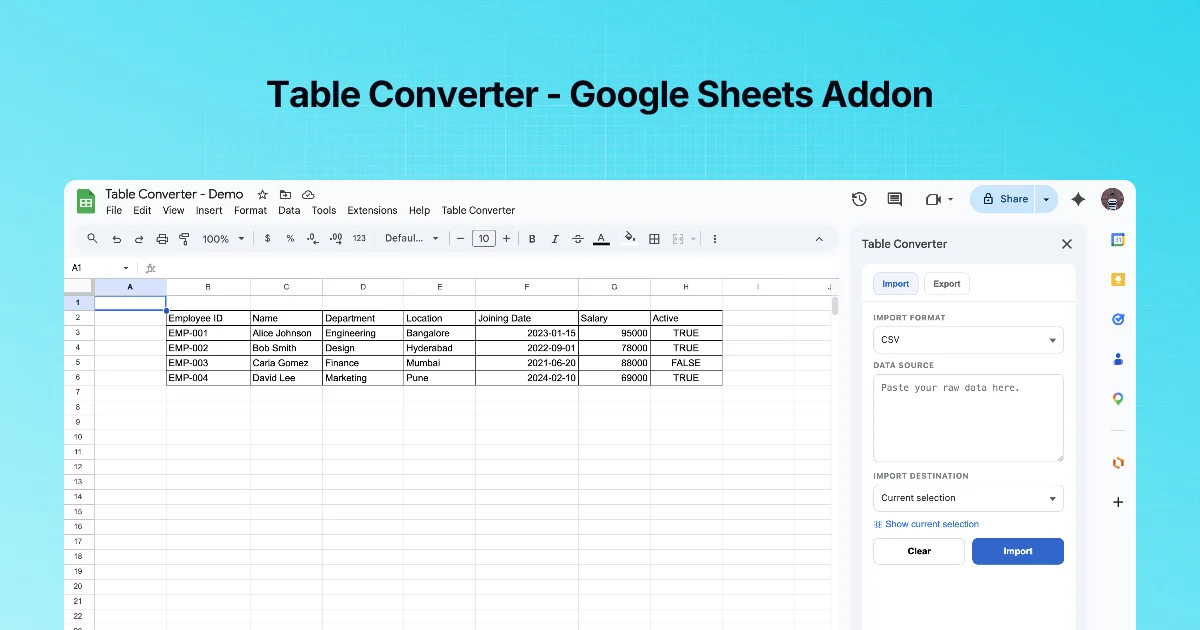
- Import a Markdown table, a JSON array, an HTML table or CSV into the current selection or a new sheet
- Export a selected range as CSV, JSON, Markdown or HTML, then copy or download it
- Prepare headers and values so exports are clean
- Run a round trip: Sheets → README → chat
Before you start
- A Google account with Google Sheets
- Table Converter installed from the Google Workspace Marketplace (free)
- Basic familiarity with Markdown or JSON helps
Chapters
Frequently asked questions
How do I convert Google Sheets to a Markdown table?
Install Table Converter, select the range including the header row, open the Export tab, choose Markdown and click Copy (clipboard) or Export (file).
How do I import JSON into Google Sheets?
Open Table Converter's Import tab, choose JSON Array, paste an array of objects, pick current selection or a new sheet as the destination and click Import. Keys become headers and each object becomes a row.
Can I paste a Markdown table into Google Sheets?
Plain paste puts each row in one cell. With Table Converter, choose Markdown Table in the Import tab, paste the table lines including the separator row, and click Import.
Which formats are supported?
Import: CSV, HTML Table, JSON Array and Markdown Table. Export: CSV, JSON, Markdown and HTML.
Will importing overwrite my data?
It writes at the current selection, which can overwrite cells. Choose a new sheet as the destination when you are unsure.
How do I handle nested JSON?
Flatten it first, for example with jq, so each nested field becomes its own key. A flat table holds one value per cell.
Is Table Converter free?
Yes. The Marketplace listing shows it as free of charge.
Why does my CSV split columns in the wrong place?
A value containing a comma was not wrapped in double quotes at the source. Quote it, or fix the export that produced the CSV.
How do I get a Sheets table into Microsoft Teams?
Export as HTML, or export Markdown and convert it with the Markdown to Teams tool before pasting. Teams does not reliably render raw Markdown tables.