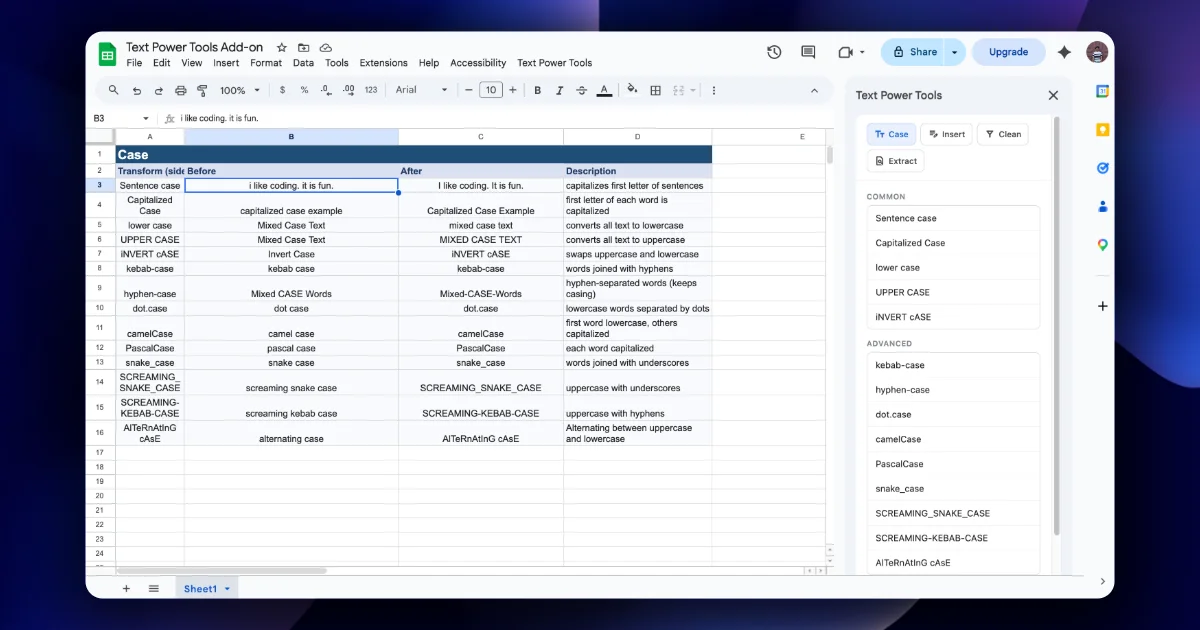
The Case tab has two groups. COMMON covers everyday capitalisation; ADVANCED covers the naming styles programmers use for column names, keys, slugs and constants.
Common styles
| Option | What it does | "the QUICK brown fox" |
|---|---|---|
| Sentence case | Capitalises the start of sentences | The quick brown fox |
| Capitalized Case | First letter of each word uppercase | The Quick Brown Fox |
| lower case | Everything lowercase | the quick brown fox |
| UPPER CASE | Everything uppercase | THE QUICK BROWN FOX |
| iNVERT cASE | Swaps upper and lower per character | THE quick BROWN FOX |
Use Capitalized Case for people's names and titles, Sentence case for descriptions, UPPER CASE for codes such as country or currency codes.
Names need care. Capitalized Case turns mcdonald into Mcdonald and o'neil into a result you should check. Review a sample after converting names.
Advanced naming styles
The sidebar lists nine:
| Option | "Customer Order ID" becomes | Typical use |
|---|---|---|
| kebab-case | customer-order-id | URL slugs, CSS classes |
| hyphen-case | word-style hyphenation | Readable hyphenated labels |
| dot.case | customer.order.id | Config keys |
| camelCase | customerOrderId | JavaScript and JSON keys |
| PascalCase | CustomerOrderId | Class and type names |
| snake_case | customer_order_id | Database columns, Python |
| SCREAMING_SNAKE_CASE | CUSTOMER_ORDER_ID | Constants, env variables |
| SCREAMING-KEBAB-CASE | CUSTOMER-ORDER-ID | Some HTTP headers and labels |
| AlTeRnAtInG cAsE | cUsToMeR oRdEr Id (pattern varies) | Fun, not data |
The listing describes hyphen-case as "word-style hyphenation", distinct from kebab-case.
Where naming styles save real time
- Preparing a header row for a database import. Select the header row, choose snake_case, click Apply.
Ship Date→ship_date, ready for aCREATE TABLE. - Generating JSON keys. Convert headers to camelCase before exporting with Table Converter (see the Table Converter course).
- Building slugs. A title column converted to kebab-case gives URL slugs. Strip punctuation first with the Clean tab.
- Environment variable lists. SCREAMING_SNAKE_CASE for a column of setting names.
Step by step: header row to snake_case
- Type sample headers in row 1:
Customer Name,Order ID,Ship-Date,Total amount. - Select row 1's cells only.
- Open Case, scroll to ADVANCED, choose snake_case, click Apply.
- Expected:
customer_name,order_id,ship_date,total_amount. - If an input had punctuation such as
Total ($), clean it first: Clean → Strip specific characters()$.
Order of operations
Run Clean before Case. Stray spaces and punctuation become stray underscores or hyphens in naming styles: " Order ID " might become _order_id_. Trim first and you avoid the problem.
Practice: the same text in six styles
Put customer first name in A1:A6 (six copies, so you can compare side by side). Select one cell at a time and apply a different style from the Case tab:
| Style | Result |
|---|---|
| Capitalized Case | Customer First Name |
| UPPER CASE | CUSTOMER FIRST NAME |
| snake_case | customer_first_name |
| camelCase | customerFirstName |
| kebab-case | customer-first-name |
| SCREAMING_SNAKE_CASE | CUSTOMER_FIRST_NAME |
Then try a messy input: Customer-First name (extra spaces, a hyphen, mixed case). Apply snake_case and check whether you get customer_first_name or something with doubled underscores. Whatever the result, running Trim both from the Clean tab first removes the edge spaces, which is why chapter 2 comes before this one.
Names that should not be title-cased
Capitalized Case changes every word, which is wrong for some real data: McDonald becomes Mcdonald, iPhone becomes Iphone, van der Berg becomes Van Der Berg, and acronyms like IIT become Iit. Sheets' own =PROPER() has the same limitation. For people's names and product names, apply the case change, then sort the column and scan for these patterns, or leave such columns as they are.
Quick check
-
Which style for Postgres column names?snake_case.
-
Your slugs come out with odd characters. What did you skip?Cleaning punctuation (Clean tab) before converting to kebab-case.
-
Which common style fits a list of book titles?Capitalized Case (then review exceptions).