A workbook starts with one tab. Then it gets one per month, one per client, one per import, a few "Copy of …" experiments and a couple of hidden tabs nobody remembers. That pile is tab debt. It costs time every day: scrolling the tab strip, right-clicking one tab at a time, missing hidden tabs before you share the file.
What Sheets gives you natively
Google Sheets lets you work on tabs from the tab strip at the bottom and the All sheets list (the ☰ icon at the bottom left). You can right-click a tab to delete, duplicate, rename, colour, hide or move it. Selecting several tabs with Ctrl/⌘ or Shift and acting on them together works for some actions in current Sheets.
What it does not give you is a searchable list with checkboxes, bulk rename, bulk unhide, and sorting. That is the gap Sheets Tab Manager fills.
A tour of the sidebar
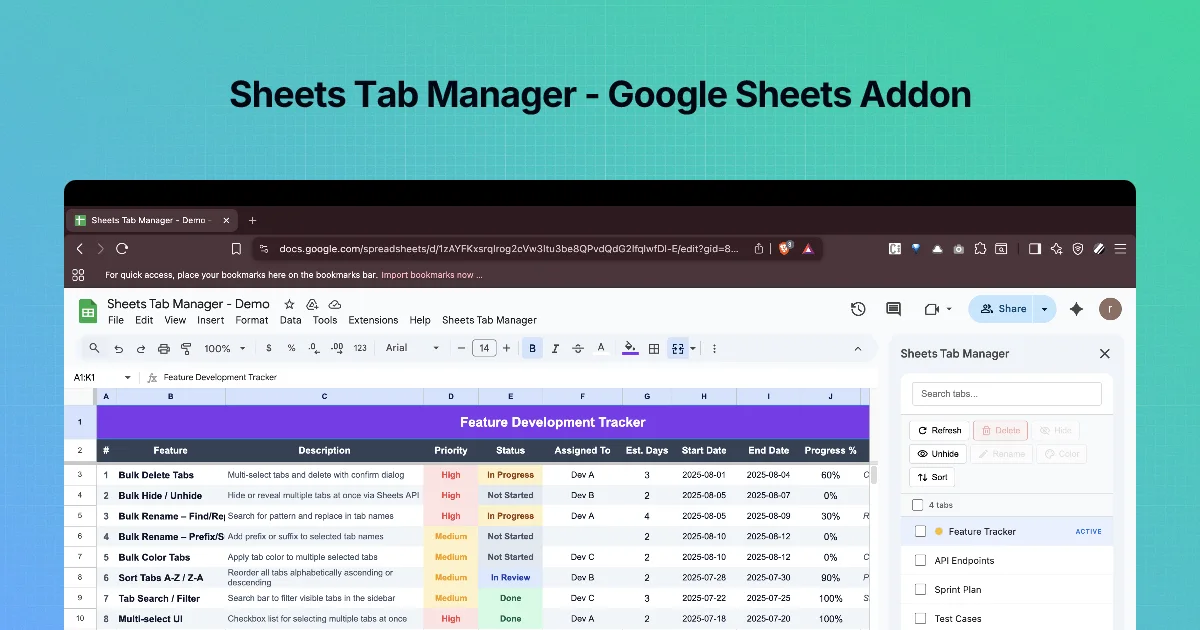
Open the add-on from Extensions (its post says "open Extensions and launch the add-on"). The sidebar, titled Sheets Tab Manager, has:
| Part | What you see |
|---|---|
| Search | A Search tabs... box that filters the list as you type |
| Actions | Refresh, Delete, Hide, Unhide, Rename, Color, Sort |
| Count | e.g. "4 tabs" and "2 selected" |
| List | One row per tab with a checkbox; badges such as ACTIVE (the tab you are on) and HIDDEN |
| Footer | "Built by ysskrishna" and a GitHub link |
Actions that need selected tabs stay greyed out until you tick at least one.
The basic flow
- Search to narrow the list (for example
2025). - Tick the tabs you want (or use Select all on a filtered list).
- Click an action. Destructive or multi-step actions open a dialog to confirm or set options.
- Refresh if you changed tabs in the sheet itself while the sidebar was open.
When to use it
- More than about ten tabs, or any batch change to more than three tabs.
- Before sharing a file: hide working tabs, unhide everything to audit, delete scratch tabs.
- When naming conventions change: "Q1 2025" → "2025-Q1" across twelve tabs.
Step by step: first look
- Install Sheets Tab Manager from its Marketplace listing.
- Open a workbook with several tabs, or make one with tabs
Jan,Feb,Mar,Notes,Scratch. - Open the sidebar. Check the count matches your tabs, and that hidden tabs show a HIDDEN badge.
- Type
ain the search box and watch the list filter. Clear it.
How tab debt builds up
Tab debt rarely comes from one person. The usual sources, and what each needs:
| Source | Typical names | What to do |
|---|---|---|
| Monthly or weekly snapshots | Jan, Feb 2025, Week 32 | Keep the last few visible, hide or move the rest |
| "Copy of" duplicates | Copy of Budget, Budget (2) | Compare with the original, then delete |
| Scratch tabs | Sheet7, test, tmp | Delete after checking nothing references them |
| Imported data | Export_2025-03-01 | Keep only the latest; older imports belong in an archive file |
| Lookup tables | Lists, Config | Keep, hide from casual readers |
Each row needs a different action, which is why a single "clean up" button would be dangerous. The add-on gives you the separate actions (Delete, Hide, Rename, Color, Sort) on a selected set, so you can treat each group the way it deserves.
Check before you change anything
Before any bulk action on someone else's file, answer three questions:
- Does anything reference this tab? A formula like
='Feb 2025'!B4on another tab shows#REF!once the tab is deleted. Use Sheets' Edit → Find and replace, tick "Also search within formulas", and search for the tab name. - Is it linked from outside? Other files may pull the tab with
IMPORTRANGE, and Looker Studio reports may read it directly. Ask the file owner if you are not sure. - Can you get it back? Sheets keeps a version history (File → Version history → See version history). Name the current version before a big clean-up so it is easy to find.
Practice
Open a copy of a real file with more than ten tabs. In the sidebar, use Search tabs... to find every tab whose name contains "Copy". Note the count shown under the search box, then clear the search. You have not changed anything yet; the goal of this chapter is only to see the size of the problem.
Quick check
-
Which badge tells you which tab is currently open?ACTIVE.
-
You added a tab in the sheet while the sidebar was open, and it is missing from the list. What do you click?Refresh.
-
Name three bulk actions the sidebar offers that the tab strip makes slow.Any three of: delete, hide, unhide, rename, colour, sort.